Key Takeaways
- Two Ways to Digitize Photos: Professional scanning services are ideal for large or delicate collections, while mobile apps offer a convenient way to scan photos at home.
- Scanning vs. Restoration: Scanning creates digital copies, but scratches, fading, and other damage may still require additional restoration.
- Beyond Scanning: AI photo restoration can improve damaged images, while cloud storage and independent backups help preserve digital photo collections over time.
Introduction
Old family photos often end up tucked away in albums, drawers, or storage boxes. Over time, fading, moisture, and physical wear can damage them, making photo digitization a practical way to preserve those memories.
But finding the best photo scanning services isn’t always straightforward. Some specialize in scanning large collections at affordable prices, while others focus on image quality and careful handling. Smartphone scanning apps offer another option for those who prefer to digitize photos at home.
To help you navigate your options, we’ll compare 10 photo scanning services and apps across different budgets and needs, looking at their features, pricing, and limitations. We’ll also cover how to restore damaged photos and keep your digital collection organized once the scanning is done.
What Are Photo Scanning Services?
A picture scanning service converts physical photographs, slides, and negatives into digital files, typically in JPEG or TIFF format. There are two common ways to digitize old photos: using a professional scanning service or scanning them yourself with a smartphone app.
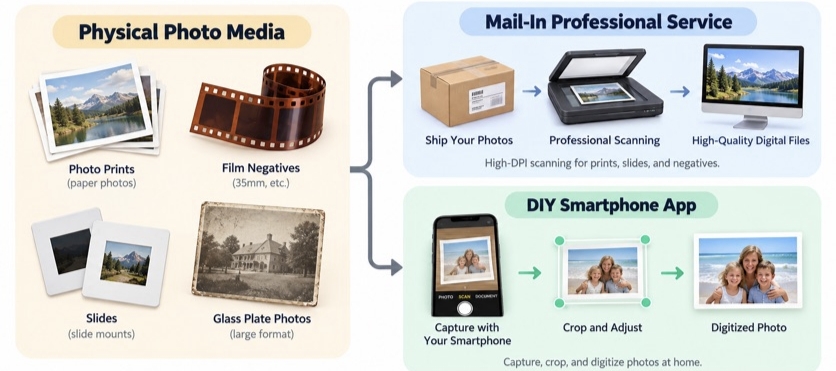
1. Professional Mail-In Scanning Services
You pack your photographs, slides, or other supported materials and send them to a professional scanning facility. Depending on the provider and media type, technicians use dedicated scanning equipment to produce high-resolution digital images.
Some services also offer basic color correction, dust removal, or additional restoration options.
2. Smartphone Photo Scanning Apps
These apps use your phone’s camera to capture printed photographs directly from a table or album page. Many automatically detect photo edges, crop images, and correct perspective, while some use multiple captures to reduce glare.
This approach is convenient for smaller collections or anyone who prefers to digitize photos at home.
Crucial Archival Insight: Scanning is not the same as restoration. A digital scan may still show the scratches, fading, and stains present in the original photograph. Although some services include basic corrections, more extensive damage may require additional digital restoration.
10 Photo Scanning Services and Tools at a Glance
The following options cover two different approaches
Prices reflect publicly listed information checked in October 2026. Promotions, order size, supported formats, and optional services can affect the final cost.
|
Service / Tool |
Category |
Pricing Model |
Best For |
Key Limitation |
|
Mail-In Service |
Prepaid box ($169–$250) |
High-volume scanning of loose prints |
Requires photo preparation; less economical for partially filled boxes |
|
|
Mail-In Service |
Per-photo or Value Kit pricing |
High-resolution scans and image review |
Processing times and optional upgrade fees |
|
|
Mail-In Service |
Kits from $69.98; separate bulk photo pricing |
Mixed media collections, including photos, tapes, and film |
Different package limits and additional delivery costs |
|
|
Mail-In Service |
$0.99/photo; promotional rates available |
Family media access and sharing |
Cloud access and AI enhancement may cost extra |
|
|
Professional Service |
From $0.98/photo; $50 service fee |
Fragile prints and personalized organization |
Higher costs for smaller projects |
|
|
Mail-In Service |
Per-photo pricing based on resolution and handling |
Secure handling and fast processing options |
Minimum order charges and additional handling fees |
|
|
Mobile App |
Free entry; paid subscription |
Batch scanning of photo albums |
Paid features and occasional crop adjustments |
|
|
Mobile App |
Free |
Reducing glare on glossy photographs |
Multiple captures required for each photo |
|
|
Mobile App |
Limited free use; paid subscription |
Family history and AI photo enhancement |
Unlimited scanning and restoration require a subscription |
|
|
Mobile App |
$9.99 one-time purchase |
Multi-photo scanning with on-device processing |
iPhone and iPad only; not for film negatives |
Pricing models are more useful than temporary discounts when comparing services. Always check the current checkout total before ordering.
6 Best Professional Photo Scanning Services
When evaluating the best photo digitizing service for large physical collections, mail-in providers deliver commercial-grade resolution and eliminate hands-on labor.
1. ScanMyPhotos: High-Volume Bulk Photo Scanning
Best for: Families with large collections of standard printed photographs who want an economical way to digitize them.
ScanMyPhotos specializes in bulk photo digitization through its prepaid scanning boxes. Rather than paying for each photograph individually, customers order a box, fill it with eligible prints, and send it to the company’s California scanning facility.
The process is straightforward:

Customers can choose between 300 DPI and 600 DPI scanning. According to ScanMyPhotos, each box holds approximately 1,800 photographs, depending on their size and arrangement. The service accepts prints ranging from 3×3 to 8×10 inches.
For someone sorting through decades of family vacations or childhood photographs, this approach reduces the need to arrange individual scanning orders. However, photographs must be prepared according to the company’s packing guidelines, and preserving a specific scanning order may cost extra.
What works well
• Prepaid boxes simplify budgeting for large collections.
• Both 300 DPI and 600 DPI scanning options are available.
• Domestic three-way shipping, original photo return, and digital downloads are included.
What to consider
A partially filled box increases the effective cost per photo. Optional services, such as image rotation or maintaining a specific order, may also increase the total.
Standard turnaround is approximately 3 to 7 weeks, so it may not suit customers with an urgent deadline.
Pricing: Promotional prepaid box prices start at approximately $169 for 300 DPI scanning and $250 for 600 DPI scanning. Prices and promotions may change.
2. ScanCafe: High-Resolution Scanning and Manual Image Correction
Best for: People who prioritize scanning resolution, image quality, and control over their final digital collection.
ScanCafe handles printed photographs, slides, and negatives, with standard scanning resolutions of 600 DPI for paper photos and 3,000 DPI for 35mm slides and negatives.
Unlike services focused primarily on bulk processing, ScanCafe emphasizes individual image correction. Its standard enhancements include cropping, color correction, red-eye removal, and dust or scratch reduction.
One particularly useful feature is its image review process. Under eligible service plans, customers can review the scanned images and reject up to 20% without paying for those rejected scans.
This can be valuable when digitizing a collection of old negatives containing duplicate shots, poor exposures, or photographs that are no longer needed.
ScanCafe also provides optional TIFF files and higher resolution scanning. For customers planning further photo editing or archiving, these options offer more flexibility than standard JPEG delivery.
Where it stands out
Its combination of manual image correction, resolution upgrades, and image review gives customers greater control over the final collection. Dedicated photo restoration is also available for more extensive damage.
Limitations
Standard processing can take several weeks. Higher resolution files, TIFF output, express processing, and advanced restoration may involve additional charges. The review option also depends on the selected service.
Pricing: Published photo scanning rates start around $0.48 per image in certain service configurations, with additional charges for selected upgrades.
3. Legacybox: Multi-Format Household Media Digitization
Best for: Families who want to digitize photographs, videotapes, film reels, and other older media in a single order.
Legacybox offers mail-in digitization kits designed for mixed household collections. Customers receive a kit with packing instructions, tracking barcodes, and a prepaid shipping label.

The service supports several types of analog media, including:
• Printed photo bundles
• VHS and other supported videotapes
• 8mm and other supported film reels
• Audio cassettes
Its standard kits count a bundle of 25 photographs as one item, just as a single tape or film reel counts as one item. Each item receives a tracking barcode to help identify it throughout processing.
Legacybox also offers dedicated bulk photo scanning boxes for standard 3×5 and 4×6 prints.
This distinction matters when choosing a package. A household with 100 photographs and several VHS tapes may benefit from a standard mixed media kit, while a collection containing thousands of loose prints may be better suited to a bulk photo scanning product.
Key advantages
• Multiple media formats can be submitted in one order.
• Prepaid kits include packing instructions and barcode tracking.
• Digital downloads, USB drives, and disc delivery are available, depending on the selected package.
Watch the package details
Standard kits and bulk photo scanning boxes follow different pricing and quantity rules. Check the supported print sizes and item limits before ordering.
Legacybox also includes a 30-day cloud access trial. Download and back up your digital files before the trial ends if you do not plan to maintain a paid subscription.
Pricing: Standard kits start at approximately $69.98 for a two-item starter package. Bulk photo boxes are priced separately, with promotional rates varying by capacity.
4. iMemories: Family Media Access and Sharing
Best for: Families who want to digitize old photographs and easily view or share the resulting files online.
iMemories converts physical photographs, videotapes, and movie film into digital files. Its main distinction is the integration of digitization with an online media library accessible through the iMemories app.
After conversion, customers can view, download, and share their photographs and videos, making the service useful for families living in different locations.
For example, one person can arrange the digitization of a collection of childhood photographs and then share selected memories with relatives without mailing physical copies.
The service also offers optional AI enhancement, allowing customers to improve certain aspects of their digitized media for an additional charge.
Pricing: Standard photo conversion costs $0.99 per photo, with an advertised promotional rate of $0.49 per photo when eligible discounts apply. AI enhancement is charged separately, and the cloud service includes a 30-day trial.
A practical consideration
The online library is convenient, but cloud access and AI enhancement should be considered separately from the scanning price.
Customers planning to preserve a large family archive should calculate the full cost and download independent copies of their files before any trial access expires.
5. EverPresent: Fragile and Unusual Photo Collections
Best for: Delicate photographs, scrapbooks, oversized prints, and collections requiring individual handling or careful organization.
EverPresent focuses on professionally digitizing photographs that may be difficult to process through routine bulk scanning.
Its supported materials include standard prints, slides, negatives, photo albums, framed photographs, and oversized items. The company also provides organization and metadata services for collections that require additional context.
For example, an inherited family album may contain fragile portraits, handwritten captions, and photographs arranged in chronological order. Removing every print could damage the materials or disrupt the original organization.
EverPresent can scan photographs from albums, preserve their sequence, and offer additional services such as caption transcription and custom metadata organization.
Standard photo scanning includes 600 DPI resolution, cropping, straightening, dust removal, and basic image optimization.
Pricing: Standard photo scans cost $0.98 each for the first 200 images, with a discounted rate of $0.68 for additional qualifying scans. A $50 service fee applies to orders. Album handling, advanced organization, and optional enhancements cost extra.
What makes it different
Beyond scanning resolution, EverPresent offers more flexibility in how original photographs are handled and how digital files are organized. This is useful for collections where the original sequence, captions, or physical condition matters.
The trade-off
Individual handling and service fees make it less economical for small collections of ordinary prints. However, the additional care may justify the expense for fragile or irreplaceable photographs.
6. Memory Fortress: Secure Handling and Fast Processing
Best for: Customers who value domestic processing, documented handling procedures, and clearly stated turnaround options.
Memory Fortress provides photo scanning services for loose prints, album photographs, oversized images, slides, and negatives.
Unlike providers that send materials to outside processing facilities, Memory Fortress states that digitization is completed by its own team at its Atlanta facility.
Its handling process includes photographing incoming packages, documenting their contents, and keeping orders identified throughout production. The company also uses a policy of one customer order per workstation to reduce the risk of mixing materials.
The service offers different scanning resolutions and handling options depending on the condition and format of the originals.
Processing times are another important consideration. According to its current FAQ, smaller orders typically take about five business days, while larger or more complicated projects generally take around 10 business days.
Faster processing may be available through paid rush options. These timelines begin after order check-in and confirmation, rather than when the customer first ships the package.
Pricing examples
• Standard 300 DPI scanning of loose photographs: $0.29 per photo at the published online order rate.
• High-resolution 600 DPI scanning: $0.49 per photo at the published online order rate.
• Album photographs and prints requiring individual handling: $0.95 per photo at the published online order rate.
The company applies a $30 minimum charge for each media format included in an order. Return shipping charges also depend on the final order value.
Why it is worth comparing
Memory Fortress is worth considering for customers concerned about how irreplaceable photographs are handled during processing.
Its documented check-in procedures, in-house production, and optional rush services provide useful points of comparison with other mail-in scanning companies.
For time-sensitive projects, customers should confirm the complete delivery schedule, including shipping and return processing, before placing an order.
Top 4 Smart Photo Scanning Apps
For loose prints or immediate digitization needs, a mobile photo scanning app transforms a smartphone camera into a portable digitizing station.
1. Photomyne: Multi-Photo Batch Capture
Photomyne uses image recognition to detect, crop, and straighten multiple photographs captured in a single shot. This makes it particularly useful for scanning family albums without photographing every print separately.
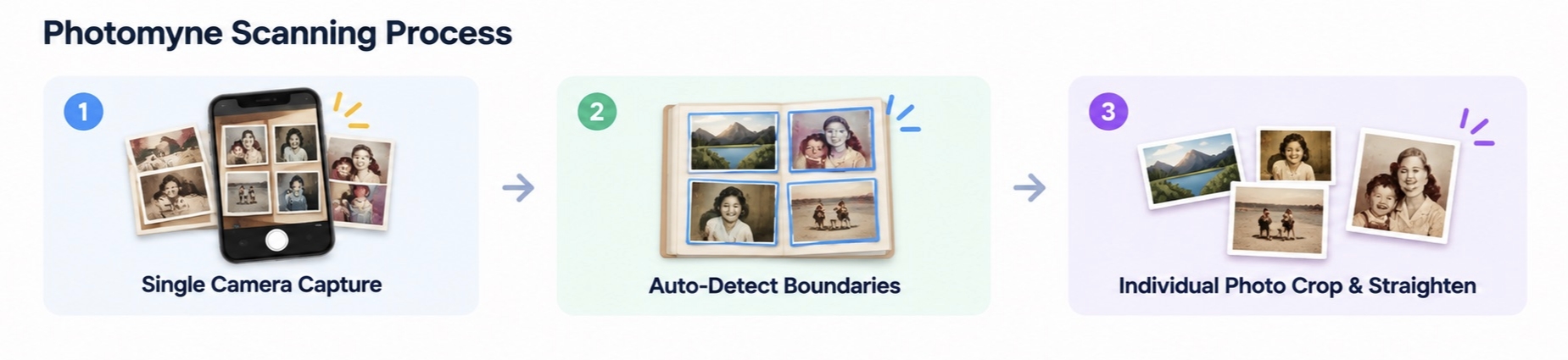
Beyond scanning, Photomyne offers automatic image enhancement, album organization, and cloud backup through its subscription service.
Where it works best: Large family albums containing multiple prints per page, especially when photographs are clearly separated and captured under even lighting.
Limitations: Automatic cropping may require manual adjustments when photographs overlap or have irregular borders. Cloud backup and some advanced features require a paid subscription.
Pricing: Free entry with paid subscription options. Prices vary by plan and platform.
2. Google PhotoScan: Best for Glare-Free Scanning
Glossy photographs often reflect nearby lights, making them difficult to capture clearly with a smartphone camera.
Google PhotoScan addresses this by combining multiple captures to reduce glare. Its guided workflow asks users to align their camera with four target dots, helping the app create a more evenly captured digital image.
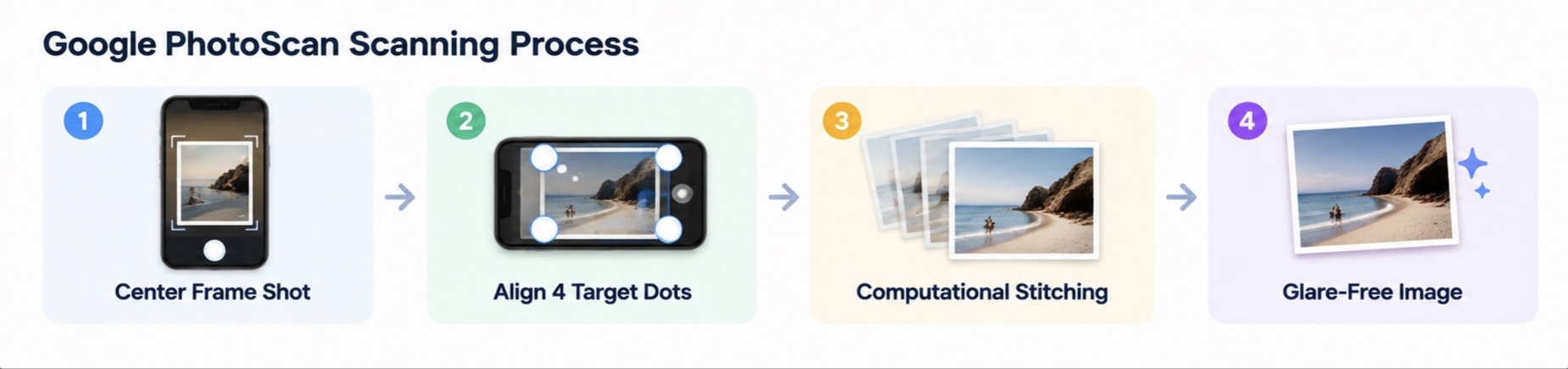
The app also applies automatic edge detection, perspective correction, and rotation, producing a straighter digital copy with minimal manual editing.
It is particularly useful for scanning individual glossy prints under indoor lighting.
What makes it useful
Unlike standard camera capture, PhotoScan uses several images taken from slightly different positions to reduce reflections. Users can also adjust the corners and rotation after scanning.
Limitations
The additional capture steps can become time-consuming when scanning hundreds of photographs. Results still depend on lighting, camera stability, and the condition of the original print.
Pricing: Free.
3. MyHeritage Reimagine: Genealogy Integration
MyHeritage Reimagine combines photo scanning with AI-powered features designed to preserve family history.
Its scanner can capture entire album pages or multiple loose photographs, automatically identifying and cropping individual images.
After scanning, users can access tools for photo enhancement, colorization, and repairing visible scratches or creases. Reimagine also connects with the broader MyHeritage ecosystem, making it useful for organizing photographs alongside family history research.
For example, someone digitizing inherited family albums can scan the photographs, enhance damaged portraits, and incorporate selected images into a family history collection.
What stands out
Reimagine combines photo digitization and AI restoration within the same app, reducing the need to switch between separate scanning and editing tools.
Limitations
AI-generated colors and reconstructed details may not accurately represent the original photograph. Some scanning and restoration features require a subscription, and users should review the service’s privacy and storage settings before uploading personal images.
Pricing: Limited free access is available. Published subscription options include approximately $7.99 per month or $49.99 per year, with availability and pricing varying by plan and region.
4. Pic Scanner Gold: On-Device Privacy for iPhone and iPad Users
Not everyone wants an ongoing subscription to digitize a collection of old photographs.
Pic Scanner Gold offers a one-time purchase alternative, allowing users to scan multiple photographs or entire album pages with an iPhone or iPad.
The app automatically detects and crops individual prints, provides image adjustments, and supports metadata editing, including dates and locations. These features can help organize photographs that have little or no identifying information.
According to its developer, scanning and image processing take place on the device without requiring users to upload their photographs to the developer’s servers.
Pricing: $9.99 as listed on the US App Store, with no recurring subscription.
Where it fits
iPhone and iPad users who want to digitize family albums, organize scans with dates or captions, and control where the resulting files are stored.
Limitations
The app is limited to compatible Apple devices. As with other camera-based scanning tools, image quality depends on lighting, camera positioning, and the condition of the original photograph. Its editing features are also less suitable for extensive restoration of severely damaged photos.
Professional Photo Scanning Services vs. AI Scanning Tools
To help you decide which category fits your needs, here’s how they compare across the most important factors:
|
Factor |
Professional Services |
Smart Scanning Apps |
|
Upfront cost |
Payment per print, package, or project |
Often free, one-time payment, or subscription |
|
Large collections |
Convenient when outsourcing thousands of photos |
Requires your time and repeated captures |
|
Scanning quality |
Dedicated equipment and resolution options |
Depends on phone camera and lighting |
|
Fragile originals |
Specialized handling may be available |
You control handling, but need care |
|
Slides and negatives |
Many services support these formats |
Requires a compatible app or capture setup |
|
Turnaround |
Processing plus shipping or delivery |
Immediate once you complete scanning |
|
Privacy |
Physical originals and files handled by a provider |
Depends on app permissions and cloud processing |
|
Organization |
Varies by provider and paid options |
Varies by app |
How to Choose a Photo Scanning Service
There’s no single best photo digitizing service for everyone. Work through these questions to narrow down your options:
1. How Many Photos Do You Need to Digitize?
-
20–30 photos: A smartphone scanning app may be the simplest option.
-
1,000+ photos: A bulk scanning service can save considerable time.
For smaller or mixed collections, per-photo pricing may be more economical. Prepaid scanning boxes generally offer better value when filled close to capacity, so compare the total cost rather than the advertised price per image.
2. What Scanning Resolution Do You Need?
Resolution determines how many pixels are captured from the original photograph.
-
300 DPI: Usually sufficient for digital viewing and reprinting at the original size.
-
600 DPI: Provides more flexibility for cropping and enlargements.
-
Higher resolutions: May be useful for slides, negatives, and small originals.
For example, a 4×6-inch print produces approximately 1200×1800 pixels at 300 DPI or 2400×3600 pixels at 600 DPI.
Higher resolution cannot recover details missing from the original. As the Library of Congress explains, appropriate scanning specifications depend on the source material and intended use.
3. What Is the Full Cost of Digitizing Photos?
The cost of digitizing photos may include more than the advertised scanning rate. Check for additional charges related to:
-
Shipping and returning original photographs.
-
Higher resolutions or premium file formats.
-
Image correction and restoration.
-
Album handling or special preparation.
-
USB delivery and digital downloads.
-
Cloud storage after a free trial.
For example, scanning 1,000 photos at $0.29 per image costs $290, compared with $490 at $0.49 per image, before additional fees. Compare the final price alongside scanning quality and included services.
4. What Happens to the Original Photos?
Fragile prints, torn edges, and delicate album pages may require special handling.
Ask whether the provider uses automated feeders, flatbed scanners, or individual scanning methods. For valuable or severely damaged photographs, consult a preservation specialist before shipping or handling them.
5. How Will You Receive the Digital Files?
Confirm the file format, resolution, and download period before ordering.
-
JPEG: Suitable for everyday viewing and sharing.
-
TIFF: Often preferable for archival copies and further editing when available.
Check whether the provider supplies original, unedited scans and whether cloud access expires. Download your files promptly and keep an independent backup rather than relying solely on a temporary online gallery.
How to Restore and Preserve Your Scanned Photos
Digitizing a physical photograph creates a permanent digital file, but scanning does not fix decades of physical wear.
Why Scanned Photos May Still Need Restoration
Physical paper prints suffer from environmental degradation over time:
-
Chemical Color Shifting: Organic dyes break down, turning mid-century color prints into monochromatic magenta or sepia tones.
-
Physical Surface Wear: Cracks, scratches, fingerprint oils, and dust cling to physical print emulsions and transfer directly into digital scans.
-
Focus & Fine Detail Blur: Older consumer film cameras often suffered from slight misfocus or soft lenses, resulting in low fine detail.
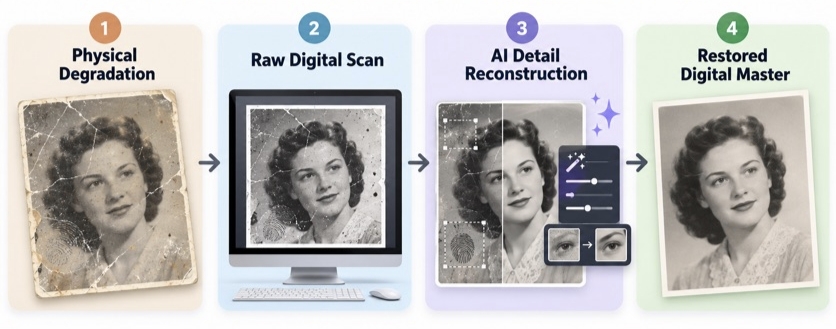
Digitization preserves the image in its current state. Modern AI restoration tools are necessary to reconstruct missing details, balance colors, and sharpen soft focus.
Restore Old Photos with TeraBox AI Image
One way to restore a digitized photograph is through TeraBox AI Image, which supports image-to-image editing using uploaded pictures and text instructions.
TeraBox AI Image does not directly capture a physical print. You first need an existing digital image from a scanner, phone, or photo scanning service.
For this example, we used a digitized vintage-style family portrait showing a woman and a young child. The source image contained prominent cracks, surface scratches, stains, and worn edges.
I need to clean up the damage while retaining the original sepia appearance.
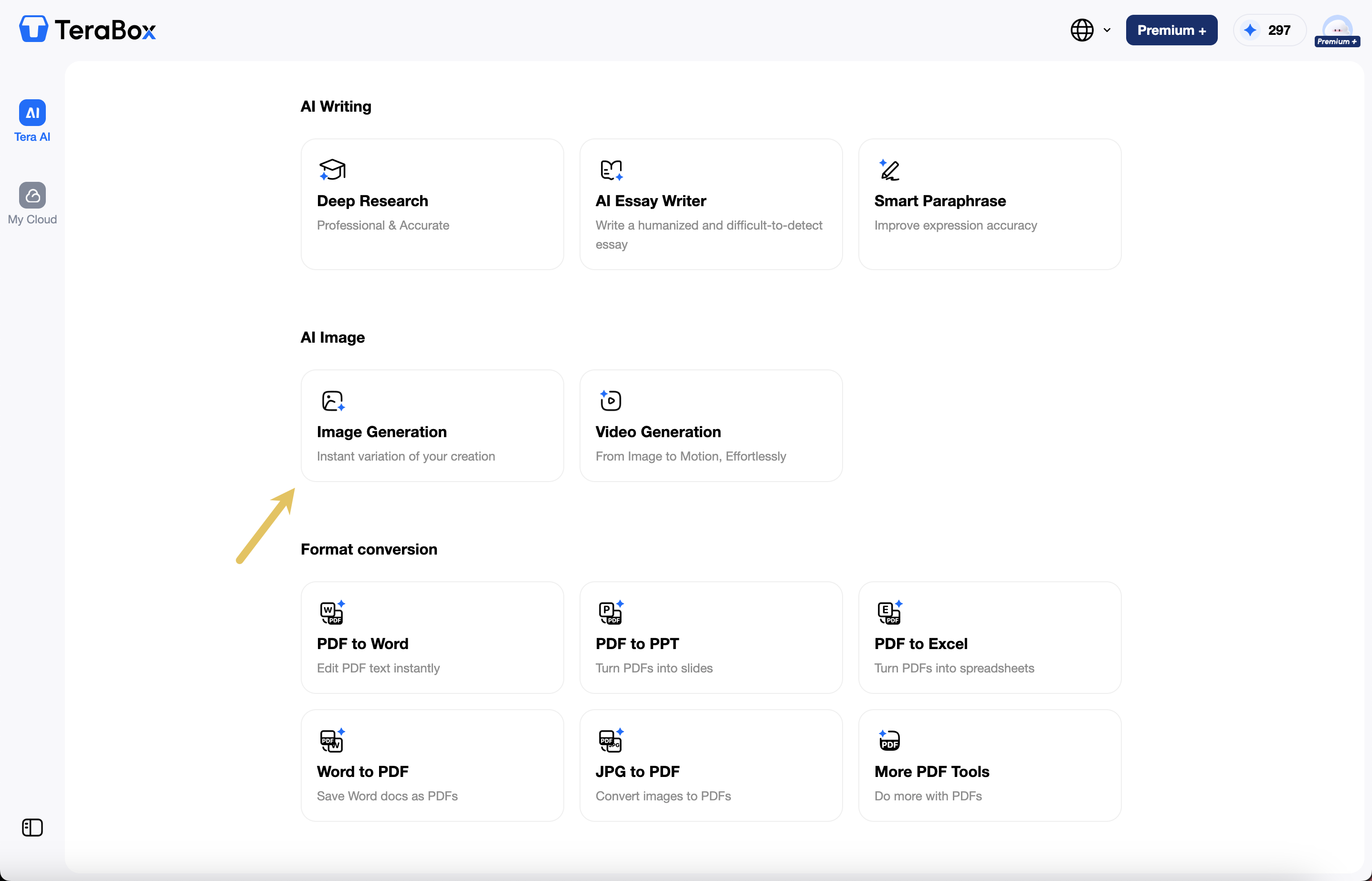
Step 1: Upload the scanned photograph
Open TeraBox and select Image Generation under AI Image.
In the image generation interface, upload the digitized photograph as a reference image.
TeraBox provides image model options, including the Nano Banana family. Choose an available model suitable for image-to-image editing.
Step 2: Describe the restoration
Instead of asking AI to simply “make this photo better,” describe the damage that needs attention and the elements that should remain unchanged.

For the family portrait, the following prompt was used:
Restore this old vintage photograph while preserving its original appearance. Carefully remove visible scratches, cracks, creases, stains, dust, and damaged areas. Reduce fading and improve contrast, sharpness, and overall clarity. Repair damaged areas naturally without changing the woman’s or child’s facial features, expressions, clothing, hairstyle, or the original composition. Preserve the original sepia tone and realistic vintage photographic texture. Do not colorize the image, add new objects, or invent facial details. Keep the restored photo looking authentic rather than AI-generated.
The instruction deliberately separates correction from preservation. Removing scratches is useful, but changing someone’s smile or inventing background details would make the image less faithful to the original.
Step 3: Review and download the result
Select Generate and wait for TeraBox to produce the edited image.
In the example output, the most noticeable cracks and surface scratches were substantially reduced. The sepia tone remained, and the composition still showed the same two subjects.
However, the output was not identical to the source. Some texture and detail had been smoothed or reconstructed.
The generated image was also 466×580 pixels.

What did the restoration improve?
|
Area |
Before Restoration |
After Restoration |
|
Scratches |
Numerous cracks across the portrait |
Most prominent marks visibly reduced |
|
Stains |
Discoloration and surface spots |
Cleaner overall appearance |
|
Facial appearance |
Partially affected by wear and scratches |
Visually clearer, with some AI smoothing |
|
Vintage tone |
Faded sepia |
Sepia style largely preserved |
|
Archival accuracy |
Original damaged digital source |
AI-generated interpretation, not an exact historical record |
For a more detailed walkthrough, see our guide on how to restore old photos.
Organize and Back Up Digital Photos
TeraBox provides 1024 GB (1 TB) of free cloud storage, allowing you to back up thousands of high-resolution scans and restored outputs in one centralized location.
1 TB Free Cloud Storage ──► Structured Folders ──► Automatic Backup ──► Cross-Device Access
Best Practices for Archival Folder Structures
Maintain clear separation between raw digital captures and finalized AI restorations:
Family_Archive/
-
01_Raw_Scans/ (Original unmodified files from scanning service or app)
-
02_Restored_AI/ (Enhanced photos processed through TeraBox AI)
-
03_Documents/ (Scanned letters, birth certificates, and backs of photos)
Using TeraBox’s automatic mobile backup ensures that scans taken on your smartphone sync instantly to your main cloud account, accessible from any desktop browser.
FAQs About Photo Scanning Services
What Is the Best Photo Scanning Service for Old Photos?
There is no single best provider for every collection.
ScanMyPhotos is worth comparing for large batches of ordinary prints, while ScanCafe offers more control over scanning quality and certain file options. EverPresent is more relevant to delicate or unusual collections, and Legacybox may be convenient for families converting photographs and videos together.
The best photo digitizing service is the one whose handling methods, file quality, delivery, and total cost suit your originals.
How Much Does It Cost to Digitize 1,000 Photos?
Using illustrative rates of $0.29 to $0.49 per photo, the scanning charge for 1,000 prints would be approximately $290 to $490.
Bulk packages can work out cheaper, while specialist handling, high-resolution output, restoration, shipping, and additional services can increase the total.
Always request an estimate based on your actual collection.
Is It Better to Scan Old Photos Yourself?
DIY scanning is suitable for smaller collections, especially if you already have a good smartphone or scanner.
Professional services are generally more convenient for very large batches and may offer better handling options for negatives, slides, or delicate materials.
If you only need to digitize a few dozen ordinary prints, starting with a photo scanning app is reasonable.
What Is the Best Way to Digitize Old Photos Without a Scanner?
A smartphone photo scanning app is one of the easiest alternatives.
Google PhotoScan helps reduce reflections, while Photomyne and Pic Scanner Gold support multiple-photo capture.
Place the printed photographs on a flat, evenly lit surface, avoid direct glare, and check each cropped image before saving it.
What Resolution Is Best for Scanning Old Photos?
For many standard prints, 300 DPI is suitable for everyday digital use. Scanning at 600 DPI provides more pixels for cropping and potential reprinting.
Negatives, slides, and particularly small originals may require a different approach. A higher DPI setting alone does not guarantee higher-quality results.
Can AI Restore Damaged Photos After Scanning?
Yes, AI image tools can help reduce scratches, stains, blur, and fading in digitized photographs. For example, TeraBox AI Image lets you upload scanned photos and use text prompts to improve their appearance without advanced editing skills.
However, AI may reconstruct missing details rather than accurately recover them. Always keep an unedited copy of the original scan, especially for valuable family photographs.
Conclusion
The best photo scanning services aren’t necessarily the cheapest or the fastest. What matters is finding an option that suits your photo collection, budget, and expectations for image quality.
Professional services are often worth considering for large or fragile collections, while smartphone scanning apps offer a convenient way to digitize everyday prints at home. Whichever method you choose, pay attention to how your original photos are handled and how the digital files are delivered.
For photos that need extra attention afterward, TeraBox AI Image can help improve their appearance, while its cloud storage provides space to keep your collection organized and accessible.