You searched for “free check printing software online” and you’re already noticing a catch: some tools watermark your checks, others expire after a trial, and a handful require you to buy proprietary stock before you can print a single real payment.
This guide cuts through the noise. We’ll explain exactly what “free” means across different products, compare the key features that determine whether a printed check will actually clear at your bank, and help you choose the right tool for your real situation — whether that’s printing one personal check a month or processing payroll for a small team.
One thing to understand before you start: software is rarely the whole cost. Even the most generous free tier may require blank check stock, MICR-compatible printing, and a calibration run before you produce a single usable check. We’ll cover all of it.
What Users Usually Mean by “Free Check Printing Software Online”
The phrase covers at least three very different situations, and confusing them is the #1 source of frustration for first-time users.
Free Online Check Creator or Web App
Many users want a browser-based tool — no installation, no IT involvement, accessible from any device. You log in, fill in payee details, pick a template, and print. The appeal is obvious. The tradeoff is that web apps are typically subscription-funded, so the “free” layer usually has a check count limit, a reduced feature set, or both. They also require a constant internet connection, which matters if you have privacy concerns about banking data traveling through a third-party server.
Free Trial vs. Free Tier vs. Watermark-Limited Software
⚠ Reality Check: Three Very Different “Free” Models
- Free trial: Full access for a limited window (often 30 days), then a subscription kicks in. Good for evaluation; not a long-term solution.
- Free tier: A permanent plan with hard limits — typically a small number of checks per month and/or restricted features like no CSV import or no multi-account support.
- Watermarked output: The software is genuinely free, but every check it prints carries a visible “FREE TRIAL” or “NOT FOR PAYMENT” stamp. Useful for testing layout; not acceptable for real payments. ezCheckPrinting is a well-known example of this model.
Free Software, But Not Free Supplies
Even software that costs you nothing may require:
- Blank check stock — pre-perforated, security-feature paper sold by check printers. A pack of 500 sheets typically runs $30–$60.
- MICR-compatible toner or ink — required by some banks for the machine-readable routing and account line at the bottom of a check.
- Security features on the stock itself — watermarks, chemically reactive paper, microprinting — which add cost but reduce fraud risk.
Budget for these before choosing a “free” tool, and your final cost picture will be much more accurate.
Can You Really Print Checks Online for Free?
Short answer: Yes — for testing, low-volume personal use, or evaluating templates. A fully usable, business-grade check printing workflow is rarely completely free from end to end.
When Free Is Enough
A free tier or trial genuinely covers your needs if you:
- Print only a handful of checks per month (personal rent, occasional vendor payments)
- Are evaluating whether a tool’s templates and layout work before committing
- Want voided check templates for setting up direct deposit
- Have no need for batch printing, integrations, or audit trails
When Free Falls Short
You’ll quickly outgrow a free tier once you need any of the following:
- Printing checks in batches from a CSV or accounting export
- Multiple bank account templates on a single platform
- QuickBooks, Zoho, or other accounting software integration
- A searchable check register or audit log
- Mailing checks on your behalf without you touching a printer
- Approval workflows or multi-user access controls
Biggest Hidden Limitations to Watch For
- Watermarks on printed output that make checks non-negotiable
- Monthly or lifetime print count caps
- No CSV or batch import
- Limited or locked template customization
- No check register or exportable transaction log
- No support for digital delivery or mailing fulfillment
- Printer alignment not verified — alignment issues can cause bank rejection
How Online Check Printing Software Works
Understanding the basic mechanics helps you evaluate products confidently — and spot when a vendor is glossing over a technically important step.
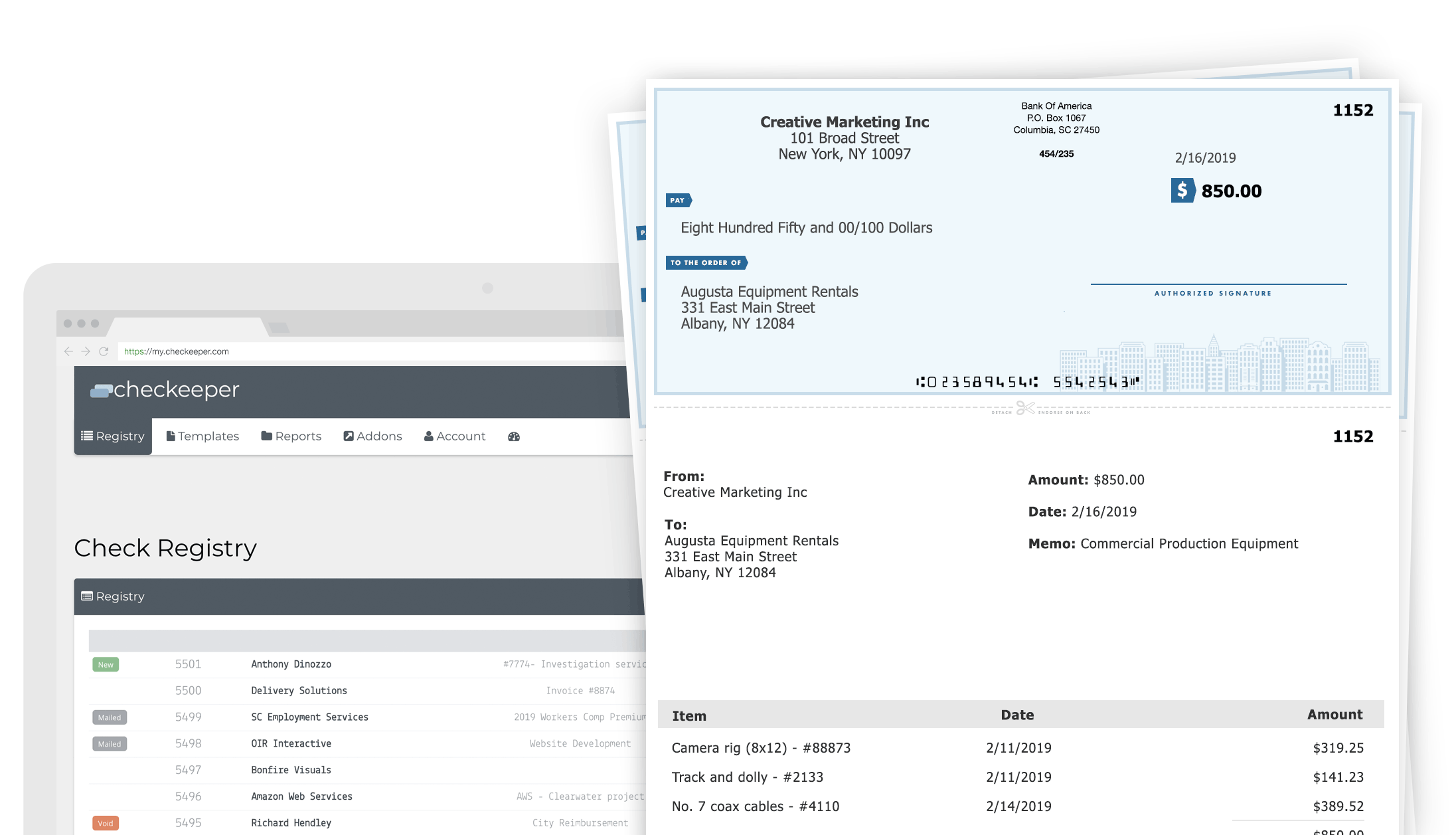
A typical online check-builder interface: enter payer and payee details, choose a template, and send to your printer — or to a mailing service.
Basic Workflow
- Enter check data — payer name, payee, amount (numeric and written), date, memo, and bank routing/account details.
- Select a template — business, personal, voucher, or a 3-per-page layout depending on your stock.
- Print or send — output to a local printer on blank or pre-printed check stock, export as PDF, or (on some platforms) hand off to a mailing service.
- Record the transaction — via the built-in check register, an accounting integration, or a manual export.
Why MICR and Alignment Matter
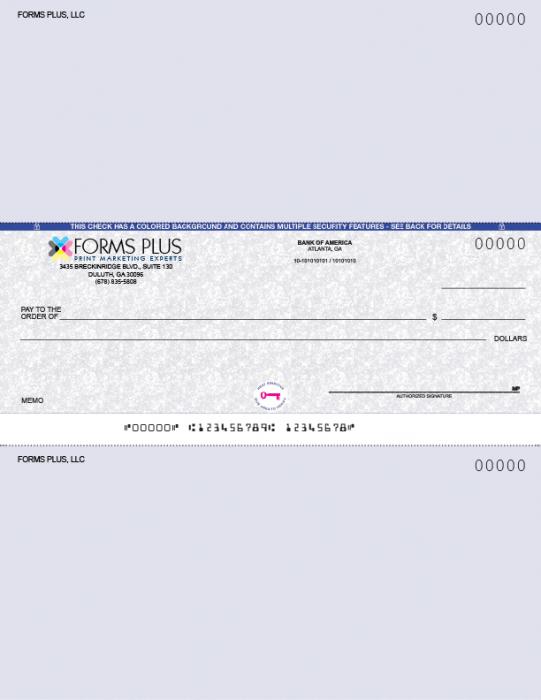
The MICR line at the bottom of a check must be positioned precisely — even a few millimeters of misalignment can trigger processing errors or bank rejection.
MICR stands for Magnetic Ink Character Recognition. The row of numbers and symbols at the bottom of a check — encoding your bank’s routing number, your account number, and the check number — must be printed in a specific E-13B font and placed within exact tolerances so automated sorters can read it.
A misaligned MICR line is one of the most common reasons a self-printed check gets rejected. Good check printing software provides a calibration or test-print tool that lets you measure offset and adjust field positions before printing real checks. If a product doesn’t mention calibration, treat that as a red flag for production use.
⚠ Bank Requirement Caution
Always verify your bank’s specific MICR and check stock requirements before committing to any software or supplies. Standards vary between institutions, and no software vendor can guarantee universal bank acceptance — that responsibility belongs to you and your financial institution.
Online vs. Desktop Check Printing Software
Both categories have genuine trade-offs:
- Online web apps — easier setup, accessible from any device, good for teams in different locations, often integrates with cloud accounting. The downside: internet-dependent, and sensitive banking data is processed on a third-party server.
- Desktop software — more precise template and layout control, works offline, and keeps data local. The downside: installation required, updates can be manual, and “free” desktop editions are often the most aggressively watermarked.
The Most Important Features to Compare in Free Check Printing Software
Check Formats and Templates
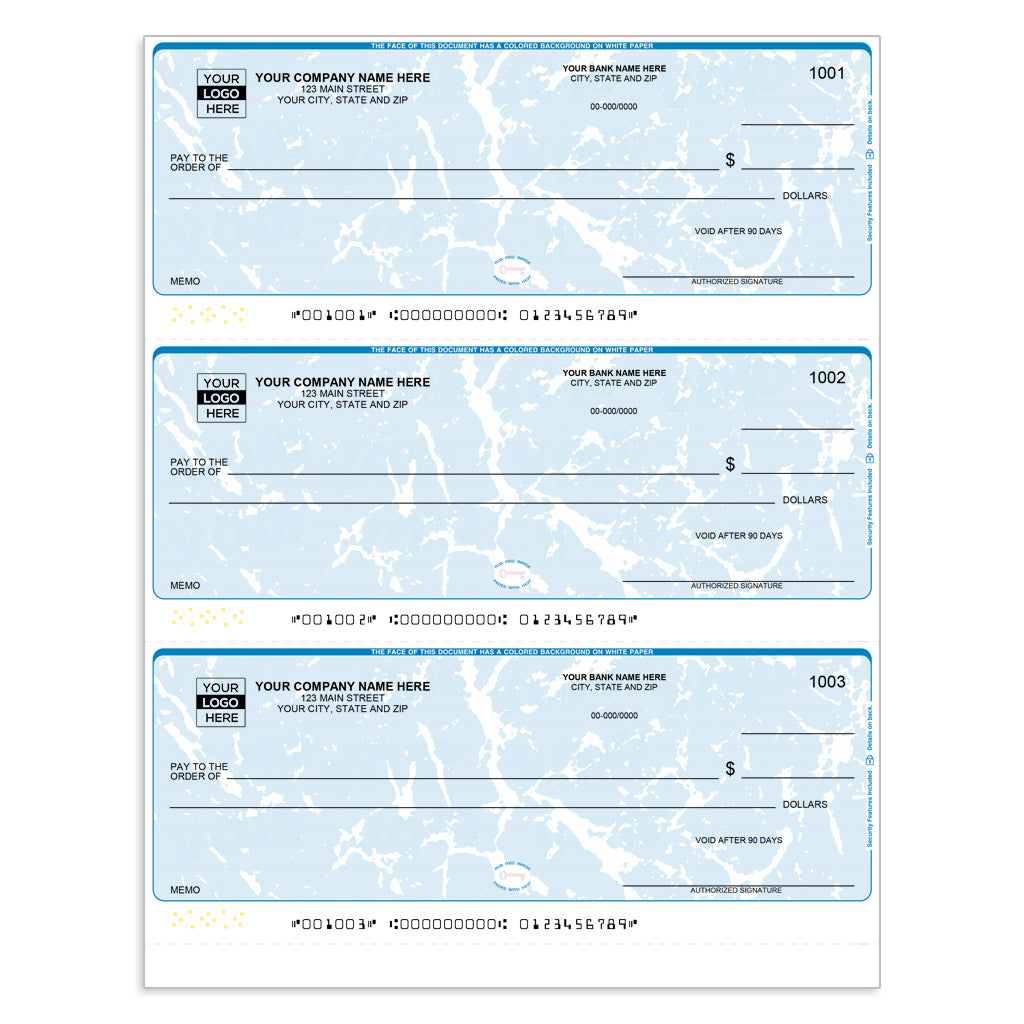
3-per-page check layouts are standard for business payroll and accounts payable. Confirm your software’s templates match your specific check stock before purchasing supplies.
Not all check formats are interchangeable. Common layouts include:
- Business top/middle/bottom — single check per page with voucher stubs
- 3-per-page (wallet or business) — three checks on a single sheet, common for payroll
- Personal-size — fits standard checkbooks
- Voucher checks — check plus detailed payment stub, common for accounts payable
One-size-fits-all templates almost never work perfectly across stock types. Confirm that the software supports your exact layout before buying supplies.
Security Features
Modern security check stock integrates multiple anti-fraud layers — watermarks, MICR encoding, QR codes, and microprinting — that work alongside software-level controls.
Fraud protection on checks is a combination of software features and physical stock properties:
- Watermarks on check stock that appear when photocopied
- Microprinting along the signature line — text too small to reproduce on standard copiers
- Chemically reactive paper that shows tampering visually
- Positive Pay — a bank-and-software workflow where you upload a list of issued checks; the bank flags any check not on your list before paying it. This is a bank feature, not purely a software toggle — confirm with your institution before relying on it.
Bulk Printing and Workflow Automation
For businesses printing more than a few checks per week, batch capability is essential:
- CSV import from spreadsheets or accounting exports
- Automatic sequential check numbering
- Batch print queue (print 50 payroll checks in one run)
- Multi-payee support in a single session
Most free tiers either block batch printing entirely or cap the number of checks per batch. This is often the first upgrade trigger for growing teams.
Integrations and Recordkeeping
A check register isn’t just a convenience — it’s a safeguard against duplicate check numbers, missing payment records, and reconciliation errors that become expensive to unwind. Look for:
- QuickBooks, Zoho, or Salesforce sync (verify which direction data flows)
- CSV/PDF export for manual reconciliation
- Searchable check history with date, payee, amount, and check number
- Audit trail showing who printed what and when (critical for multi-user environments)
Pricing Reality Behind “Free”
⚠ True Cost of “Free” Check Printing
Add these together before you compare price tags: (1) software subscription or per-check fee after the free tier, (2) blank security check stock per sheet, (3) MICR toner if required, (4) mailing or fulfillment if you outsource printing. The gap between “free software” and “free workflow” can be substantial.
Comparison: Types of Free Check Printing Software
| Option Type | Deployment | Free Model | MICR / Calibration | CSV / Batch |
| Free web-based tool (e.g., OnlineCheckWriter, Checkeeper) | Online | Free tier / trial | Varies — verify | Often paywalled |
| Desktop with free edition (e.g., ezCheckPrinting, Check Designer) | Desktop | Watermarked output | Usually strong calibration tools | Often available (may be limited) |
| Business check automation (e.g., PostGrid, VersaCheck) | Online or hybrid | Trial only (no true free tier) | Strong; may include compliance features | Yes — core feature |
| Free voided-check tools | Online | Truly free (limited purpose) | N/A (for void/setup use only) | No |
Note: Feature availability and pricing change frequently. Always verify current details on each vendor’s website before making a decision. Use this table as a framework, not a final verdict.
Who Should Use Free Online Check Printing Software?
| Small Businesses (Low Volume)
Businesses printing fewer than 10–20 checks per month may find a free tier sufficient — as long as templates, MICR support, and a basic register are included. |
| Freelancers & Sole Proprietors
Occasional vendor or contractor payments rarely justify a paid subscription. A free tier or trial is often the right starting point. |
| Landlords & Individuals
Printing a monthly rent payment or a one-off reimbursement check? A simple free tool with a personal template is usually all you need — once you verify bank acceptance. |
| Nonprofits (Very Small)
Small nonprofits with limited AP volume can often stay on a free tier, though audit log requirements may push them toward a paid plan faster than they expect. |
Teams That Should Skip Free Tools
Free tiers are the wrong starting point if you:
- Print checks at high monthly volume (payroll, accounts payable)
- Require multi-user access with role-based controls
- Need approval workflows before a check is issued
- Are subject to audit or compliance requirements that demand a verifiable audit trail
- Cannot risk watermarked or misaligned output reaching vendors or employees
For these users, the cost of a paid business-grade plan is almost always justified by the reduction in risk and manual reconciliation work.
How to Choose the Right Tool Without Risking Rejected Checks
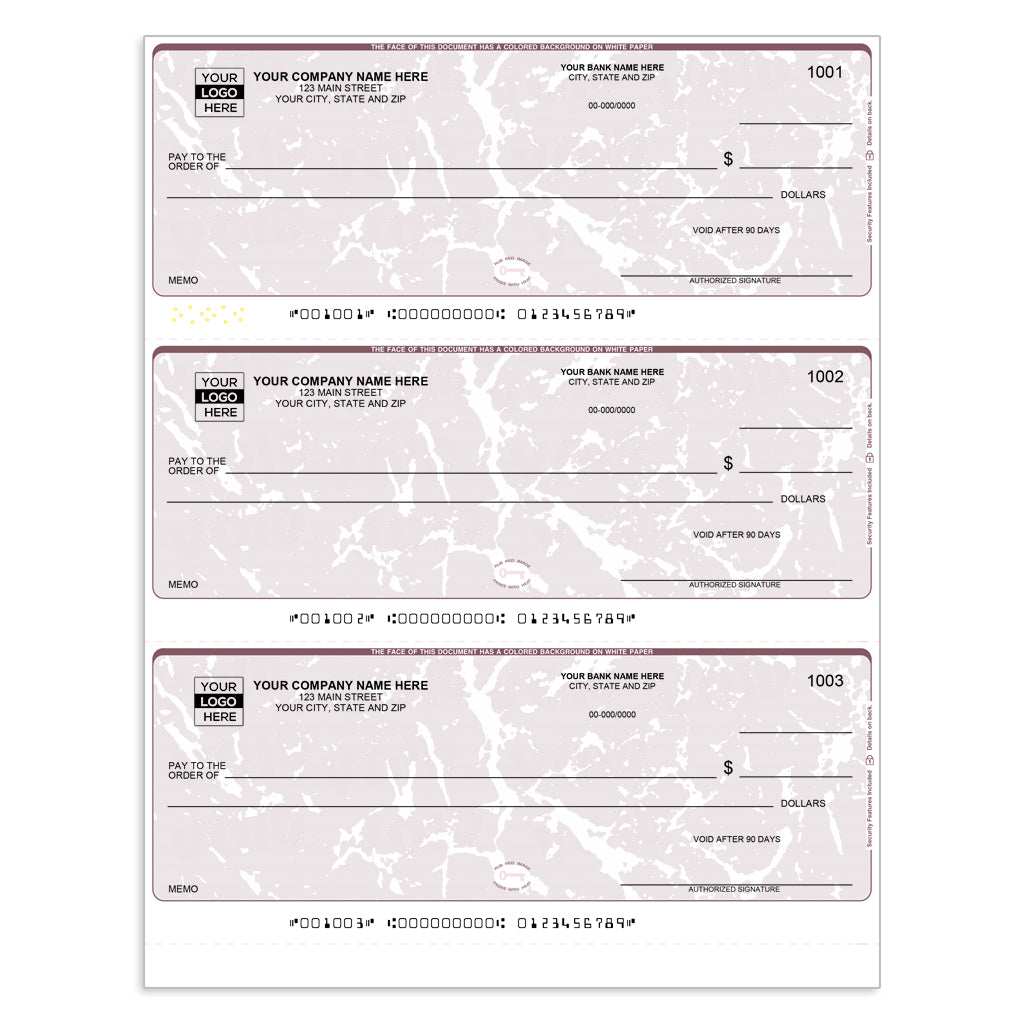
Confirming that your software’s check template matches your exact check stock format prevents the most common alignment and rejection issues.
1. Verify Your Bank’s Requirements First
Before you choose any software, call or email your bank. Ask: Does the bank accept checks printed on blank check stock? Are MICR-compatible toner or ink required? Are there formatting requirements for the MICR line? Different institutions have meaningfully different risk tolerances and technical expectations.
2. Match the Software to Your Check Format
Confirm that the templates available in the software match the physical check stock you plan to use — top-of-page business, middle, bottom, 3-per-page, or personal. Using a template designed for one layout with a different stock type is a reliable way to produce checks that won’t feed through your printer correctly.
3. Run Calibration and Test Prints Before Real Use
Any reputable check printing tool will offer a test or calibration print you can hold over a sheet of check stock to compare alignment. Do this with plain paper first, then a single sheet of stock. Confirm that the MICR line falls within the correct position and that all fields (payee, amount, date, memo) land inside their designated boxes. Only then print live checks.
4. Review the Full Cost, Not Just the Software Price
Build a realistic budget: software plan cost + blank/security check stock + printer supplies (especially MICR toner if required) + mailing or fulfillment costs if you plan to outsource physical delivery. A “free” software on top of $50 in specialty supplies and $0.80/check in mailing is a very different value proposition than it first appears.
5. Prioritize Logs and Controls If Multiple People Print Checks
The single most common operational problem in multi-user check printing environments is duplicate check numbers or unrecorded transactions. If more than one person will ever print from the same account, insist on a check register, sequential auto-numbering, and — ideally — a log showing who produced each check and when.
Common Mistakes When Choosing Free Check Printing Software
Assuming “Free” Means Unlimited Production Use
A free trial is time-limited. A free tier may cap you at five or ten checks per month. A free edition may watermark every output. Clarify the specific free model before you print your first real check — not after a vendor rejects it.
Ignoring MICR and Alignment Requirements
Checks without correct MICR encoding or with misaligned fields can be rejected by the payee’s bank, returned to you, and can cause delays in vendor or employee payments. It’s not a theoretical risk — it’s a documented operational problem. Run test prints. Verify with your bank. Don’t skip this step.
Buying the Wrong Check Stock or Format
Business top, business middle, business bottom, 3-per-page, personal — these are not interchangeable. Neither are standard and high-security stock from different vendors. Buy only what you’ve confirmed matches your software template, and start with a small quantity until your setup is proven.
Choosing a Tool Without Records or Import Features
At three checks per month, manual recordkeeping is manageable. At thirty, it becomes a serious risk. Many users choose the simplest free tool available and only discover the absence of a check register when they’re trying to reconcile accounts or investigate a disputed payment.
Overlooking Fraud and Security Considerations
Paper checks remain a significant fraud target. Watermarks, microprinting, and chemically reactive paper aren’t optional luxuries for businesses — they’re meaningful deterrents. If you’re printing checks on plain paper with no security features, you’re accepting a higher fraud risk, especially for larger-value payments.
Frequently Asked Questions
Is there any truly free online check printing software?
Some tools do offer permanent free tiers, but most impose meaningful restrictions — watermarked output, monthly print caps, or locked features like batch printing and integrations. If your needs are minimal (a few personal checks per month), a free tier may genuinely work. For production business use, expect to pay something.
Can I print checks on blank check paper at home?
Often yes — if the software supports blank-stock printing, your printer can handle the stock weight, and your bank accepts the output format. The key steps are verifying bank requirements, using appropriate security stock, and running calibration prints to confirm alignment before printing real checks. Home laser printers are typically a better fit than inkjet for check printing.
Do I need MICR toner or a MICR font to print checks?
It depends on your bank. Many modern banks can process checks printed with standard toner using OCR scanning rather than magnetic reading, but some institutions still require MICR-compatible ink or toner. Confirm your bank’s policy before assuming standard supplies are sufficient — the cost of getting this wrong is a rejected check.
Will banks accept checks printed from online software?
Many checks produced by reputable software and printed on proper check stock are accepted without issue. However, bank standards vary. No software vendor can guarantee universal acceptance — you need to verify with your specific financial institution, especially if you’re printing on blank stock rather than pre-printed check forms.
What is the best free check printing software for small businesses?
There’s no single best answer. The right choice depends on your monthly check volume, whether you need integrations or batch printing, and how important a check register is to your workflow. Start by confirming which tools support your check format and bank requirements, then evaluate free tiers against those specific criteria.
Can I print business checks from QuickBooks or CSV data?
Yes — but this feature is usually behind a paywall even on tools that otherwise have a free tier. If QuickBooks sync or CSV batch import is a core requirement for your workflow, treat it as a paid feature from the start and factor the upgrade cost into your comparison.
What are the hidden costs of free check printing software?
Beyond the software itself: blank or security check stock (typically $30–$60 per 500 sheets), MICR-compatible toner if required, printer maintenance, and — if you use a mailing service — per-check fulfillment fees. Some tools also charge per check once you exceed the free tier limit. Budget for all of these before comparing tools on software price alone.
Is online check printing safe?
Safety depends on several factors: the platform’s data security practices (look for SOC 2 certification or equivalent, verified on the vendor’s site), how it stores banking information, whether you use security check stock, and how tightly you control who can print. Reputable platforms take security seriously, but you should review each vendor’s privacy and data handling policies before entering sensitive banking details.
The Bottom Line
Free check printing software online can genuinely solve a real problem — if your needs are modest and your expectations are calibrated. The tools exist, they work, and a well-chosen free tier can save a small business or individual meaningful money. But “free” is rarely the whole story.
Before you commit to any tool, work through this checklist:
- Confirm your bank’s MICR and check stock requirements
- Verify whether the free tier watermarks output or caps usage at a level that fits your volume
- Match the software’s templates to your physical check stock format
- Run calibration and test prints before printing real checks
- Budget for stock, toner, and any mailing costs — not just software
- If multiple people print checks, insist on a register and audit log
- Move to a paid plan when volume, integrations, or compliance requirements make the cost worth it
The best free check printing solution is the one that actually clears at your bank, fits your workflow, and doesn’t cost you more in wasted stock and rejected checks than a paid plan would have.