
TeraBox has introduced several new features this June to make AI creation, learning, and file processing easier for users.
In June 2026, TeraBox introduced three major updates: Tera AI, AI Notebook, and Format Conversion. These new tools expand TeraBox from a cloud storage platform into a more practical AI workspace for everyday productivity, content creation, learning, and document handling.
1. Tera AI
TeraBox has launched Tera AI, a new AI assistant that gives users a simple entry point for AI-powered productivity.
Instead of switching between different tools for writing, research, presentation creation, image generation, or file-related tasks, users can start directly from the Tera AI interface. On the Tera AI page, users can enter a request in the input box and explore example projects such as educational slides, reports, image-based content, videos, product photos, and search-related tasks.

What Can You Do with Tera AI?
Tera AI can support different daily tasks, including:
- Searching for information
- Creating reports or written content
- Generating presentation and visual ideas
- Supporting learning and productivity workflows
For example, students can use it to prepare class materials, office workers can organize reports or business documents, and content creators can explore ideas for images, videos, or product visuals.
With Tera AI, users can interact with AI in a more direct and flexible way. They only need to describe what they want to do, and Tera AI can help turn their ideas into useful outputs.
2. AI Notebook
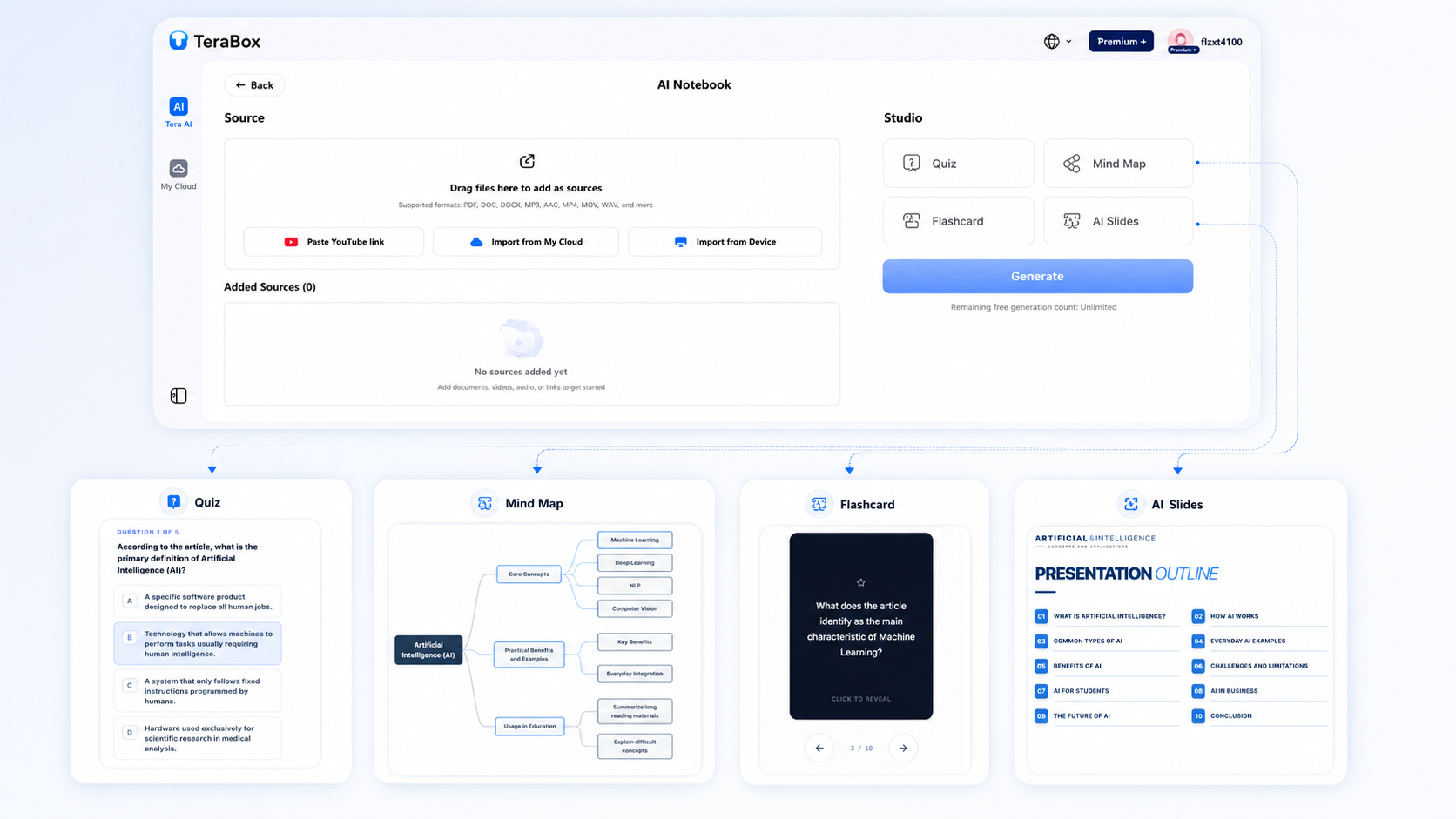
With AI Notebook, users can create a new notebook, add source files, and use AI tools to generate different types of outputs. This is useful for anyone who needs to understand, summarize, or reuse information from long documents and media files.
Add Sources and Generate Outputs
AI Notebook supports different source formats, including PDF, DOC, DOCX, MP3, AAC, MP4, MOV, WAV, and more. Users can add materials by pasting a YouTube link, importing files from My Cloud, uploading from their device, or dragging files directly into the source area.
After adding sources, users can choose from several Studio tools, including Quiz, Mind Map, Flashcard, and AI Slides. These tools help turn long documents, videos, audio files, or study materials into more structured outputs.
The generated results can be edited online, downloaded to a local device, saved to TeraBox cloud storage, or shared with others. This makes AI Notebook useful for students reviewing lecture notes, researchers organizing papers, office workers preparing reports, and content creators planning ideas from videos or audio files.
3. Format Conversion
TeraBox has also released its Format Conversion tool, giving users a faster and easier way to convert common document and image files online.
Instead of downloading extra software or switching between different conversion websites, users can now handle common file conversion tasks directly through TeraBox.
Convert to and from PDF
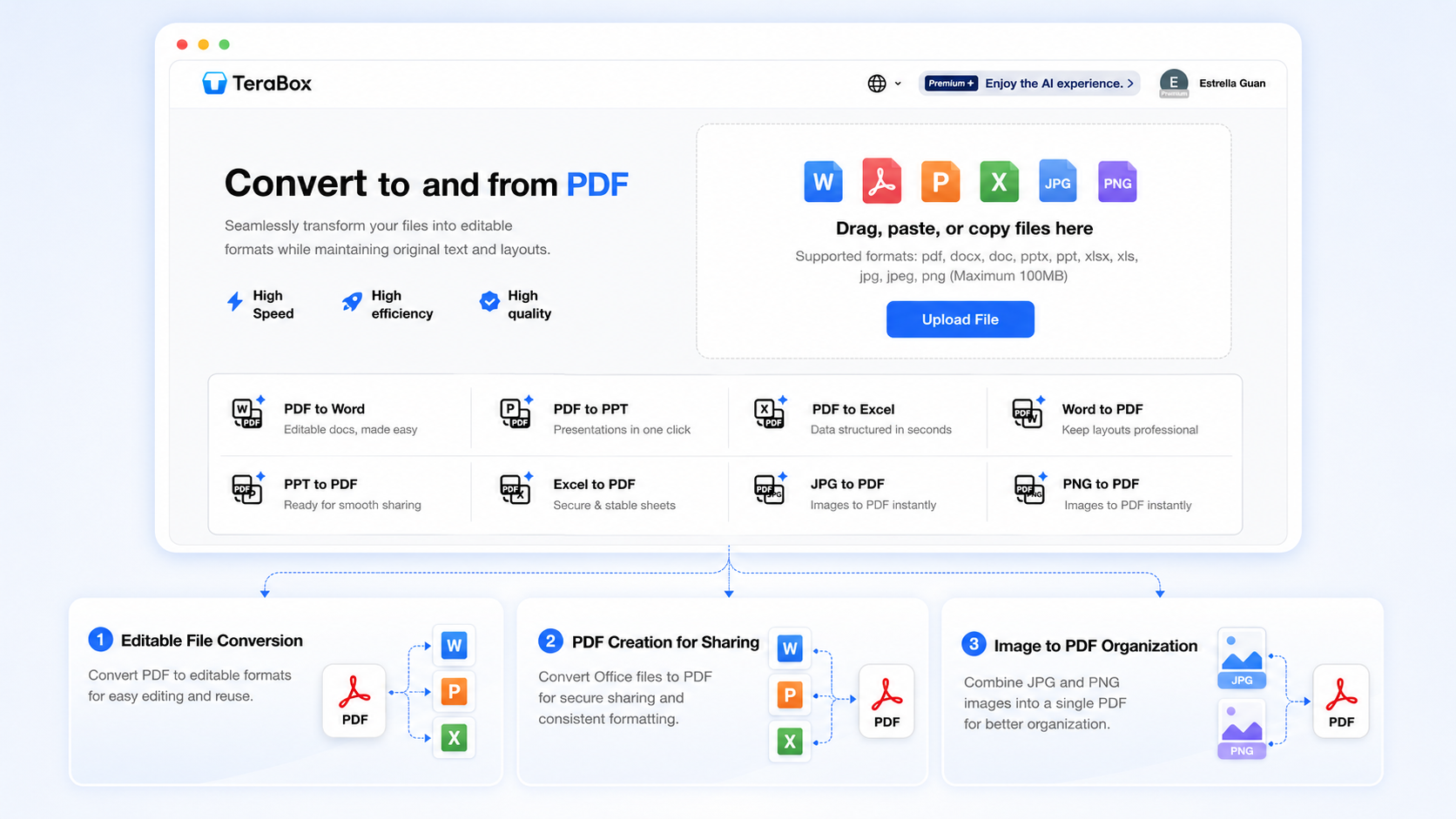
The Format Conversion feature supports common file conversion needs between PDF, documents, presentations, spreadsheets, and images. Users can convert PDF files into editable formats such as Word, PowerPoint, or Excel, and also turn Word documents, PPT files, Excel sheets, JPG images, or PNG images into PDF files for easier sharing and storage.
Users can upload files by dragging, pasting, copying, or selecting files from their device. The page currently supports formats such as PDF, DOCX, DOC, PPTX, PPT, XLSX, XLS, PNG, JPG, and JPEG, with a maximum file size of 100MB.
Common Use Cases
The Format Conversion feature can support different everyday file tasks. Below are several common use cases for reference:
Editable File Conversion
Users can convert PDFs into Word, PowerPoint, or Excel files when they need to update text, reuse content, extract tables, or turn fixed documents into editable formats.
PDF Creation for Sharing
Users can convert Word documents, PowerPoint presentations, and Excel spreadsheets into PDF files to keep layouts stable when sharing files with classmates, colleagues, clients, or online platforms.
Image to PDF Organization
Users can convert JPG or PNG images into PDF files, making it easier to organize receipts, scanned documents, ID copies, application materials, or image-based records in a cleaner format.
Conclusion
TeraBox’s June 2026 product updates bring a more complete AI and file productivity experience to users.
From Tera AI and AI Notebook to Format Conversion, these new features make it easier to search for information, organize learning materials, create content, and handle everyday file tasks in one place. Whether users are preparing study materials, working with documents, creating presentations, or converting files, TeraBox now offers a more connected workflow for both personal and professional use.
Stay updated with our latest product releases, and try the new TeraBox AI and file tools today.