You send a freshly exported JPG mockup to a client, only to hear: “It looks a little blurry. Can you send a clearer version?”
The design looked sharp on your screen, but chat platforms compressed the file, softened the text, and reduced it to a small preview. By the time the client opens it on another device, the image may no longer reflect the spacing, colors, or detail you intended.
To fix this issue and keep client reviews smooth, I tested several online converters and found TeraBox to be a practical option for client handoff, In this article, I’ll walk you through its real conversion performance, workflow benefits, and step-by-step results. Hopefully, this quick guide helps streamline your delivery process!
Why JPG Is Not Always the Best Format for Design Handoffs
JPG is one of the most widely used image formats, originally designed to compress digital photographs and web graphics into small, highly compatible file sizes. While it works great for displaying quick visual previews, handing off raw JPG files often creates several problems during client reviews, approvals, and final delivery:
- Messaging App Compression:Messaging platforms like Slack or WhatsApp automatically compress JPGs to save bandwidth, turning crisp typography, subtle shadows, and fine line work blurry.
- Inconsistent Display Sizes:JPGs lack built-in document scaling rules. A mockup meant to be reviewed at a specific scale can easily stretch awkwardly or render tiny depending on the client screen and email previewer.
- Scattered Files & Unclear Sequence:Sending multi-page concepts as separate JPGs forces clients to download multiple loose files. File names get mixed up, and page order quickly becomes confusing during reviews.
- Poor Print Readiness:Raw JPGs rasterize everything into flat pixels. Text, logos, and vector elements lose their sharp edges when printed, without native support for embedded margins or bleed settings.
- Unprofessional Delivery:Delivering a batch of loose image files looks unorganized and creates unnecessary friction for clients who need a clean, single file to present to stakeholders.
What Designers Actually Need from a JPG to PDF Tool
When preparing files for client sign-off, a dependable converter needs to handle more than just file extension changes. It should maintain original pixel density and RGB color accuracy without introducing blurriness or color shifts. It must also preserve exact aspect ratios without forced stretching, unwanted white margins, or incorrect page rotations, while processing multi-megabyte exports quickly.
Beyond rendering quality, browser stability and data security are essential baselines when handling unreleased client assets..
How to Transfer JPG to PDF Format Online with TeraBox
After different conversion tools testing, TeraBox stood out as a practical option for keeping image details and page layouts completely intact. Below, I will walk you through the exact steps to convert your JPGs using this online utility.
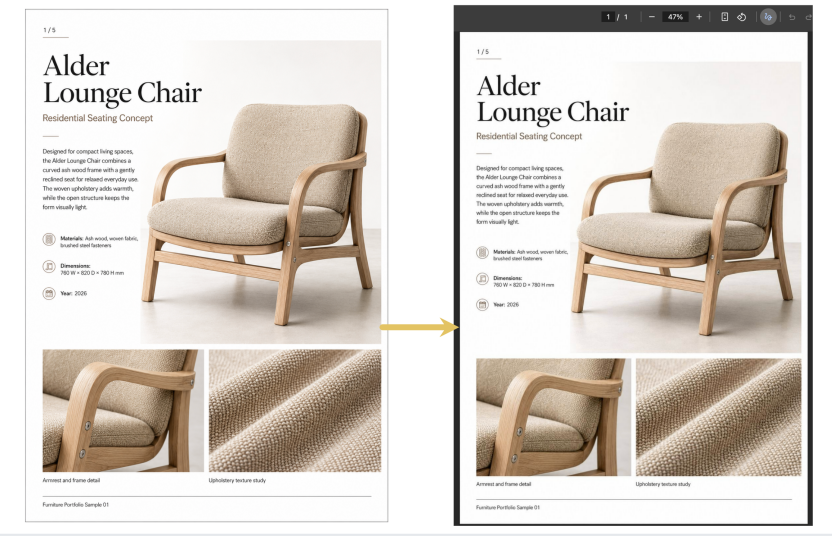
To put the converter through a real test rather than using a standard photo, I used a five-page furniture design portfolio. Each JPG followed the same portrait layout, featuring a large product render, project description, material specifications, precise dimensions, and two close-up detail crops.
Step 1: Upload the Source JPG
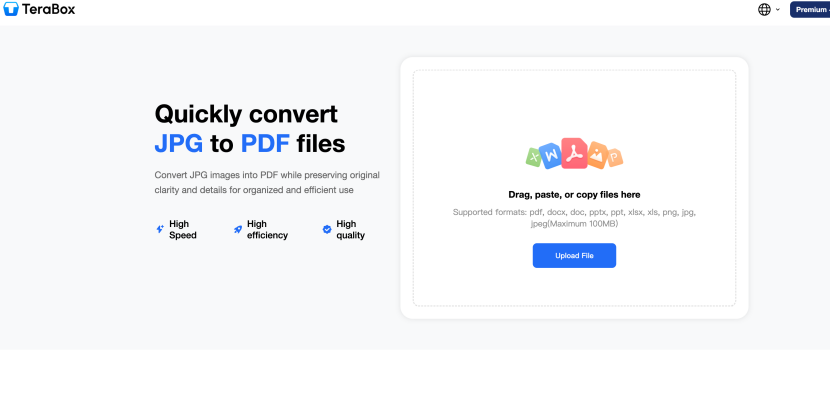
Open Terabox JPG to PDF converter interface. The drag-and-drop zone clearly indicates support for standard formats, including JPG, PNG, and JPEG, alongside document types like DOCX, PPTX, and XLSX, with a maximum file size limit of 100MB per file.
 Step 2: Confirm Format and Start Conversion
Once uploaded, the platform detects the file and displays its document title in the workspace. On the right panel, the conversion mode defaults to JPG to PDF.
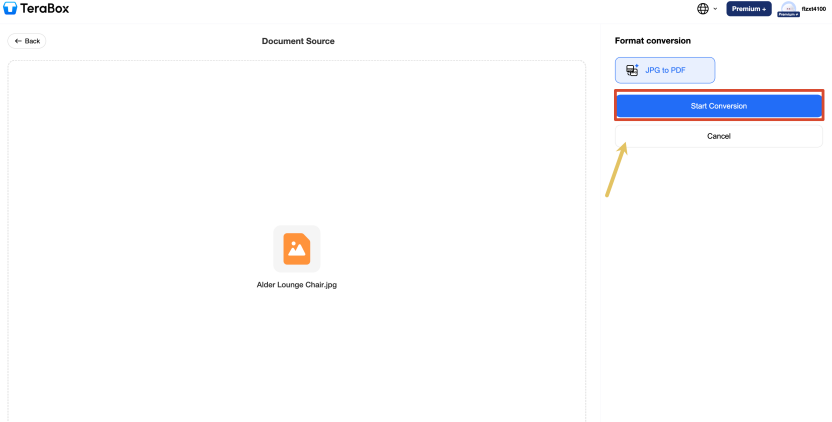
Clicking the blue Start Conversion button starts the process. For single standard images, processing completes almost instantly in under 10s without progress lag.
Step 3: Check and Download the PDF
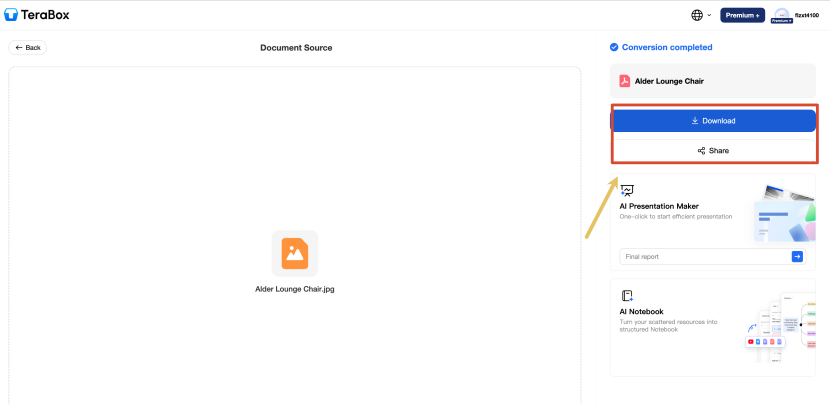
After processing finishes, the status updates to Conversion completed. Click Download to save the output locally, or use the Share option to generate a direct preview link for your team.
Why TeraBox Fits Seamlessly into a Designer’s Workflow
Converting design assets shouldn’t feel like an extra administrative task. Beyond basic format conversion, a tool needs to fit smoothly into everyday handoffs, whether you are preparing a client presentation, sending quick proofs, or archiving portfolio pieces.
Reliable Visual Quality for Client Reviews and Proofing
The main reason to convert JPGs to PDF is layout control. In our test with the five-page furniture portfolio, the output maintained full resolution across every critical detail:
- Typography & Fine Details:Small body copy under Residential Seating Concept (including dimensions like 760 W x 820 D x 780 H mm) and the page markers stayed sharp with zero edge feathering. The fabric grid in the texture study remained crisp without blurring.
- Tones & Material Integrity:Dark background areas on secondary pages did not crush into flat blacks, preserving subtle shadows and marble veining. Thin metal legs and fine seam lines remained sharp and straight.
- Layout Fidelity:The original portrait aspect ratio was preserved without forced margins or automatic rotation, ensuring clients see exact proportions on any device.
Smooth Handling of Heavy High-Res Files
High-dpi mockups, print proofs, and multi-page design decks easily blow past standard email attachment limits. Where some online converters cap uploads at 5MB or 25MB, forcing you to reopen Photoshop just to downsample your work, this tool handles files up to 100MB effortlessly. In process, converting a high-res image set took right around 10 seconds and ran smoothly from upload to final output without any freeze or lag.
A Simple, Distraction-Free Handoff
When handling confidential client mockups, unreleased concepts, or urgent revision requests, delivery convenience becomes a top priority. TeraBox provides a clean interface without misleading ads or pop-ups. Because it operates entirely in-browser without requiring software installation or mandatory account setup, you can quickly convert and share files whether you are on a workstation, an iPad, or a mobile device during an emergency client call.
Flexible Multi-Format Support
Design handoffs often involve more than just raw images. In addition to JPG and PNG conversions, the platform handles other common project documents like Word files, PowerPoint decks, and Excel spreadsheets. Having a single online converter for multiple file types keeps client reviews, pitch decks, and final asset delivery in one organized workflow.
Learn more about TeraBox converter usage: [ https://blog.terabox.com/convert-xlsx-to-pdf-for-mac-and-windows/ ]
FAQs
Does converting JPG to PDF reduce image quality or alter layouts?
In our five-page furniture portfolio test, the converted PDF preserved the original portrait layout, proportions, small text, and material details without visible cropping or pixelation. However, output quality depends on your source image, so a heavily compressed original JPG will not automatically become sharper after conversion.
How long does it take to convert a JPG to PDF?
The portfolio page used in our test was converted within a few seconds. Processing time may vary depending on the image size, internet connection, and current server load, but a standard JPG usually requires only a short wait.
What is the maximum JPG file size supported?
TeraBox allows individual image uploads of up to 100MB. This gives you plenty of headroom for high-resolution posters, heavy design mockups, and multi-page portfolios without needing to lower your export settings beforehand.
Which image formats does the converter support?
The JPG to PDF tool supports both JPG and JPEG images. TeraBox’s wider conversion workspace also handles PNG files and common document formats such as PDF, Word, PowerPoint, and Excel, although the available output options depend on the selected conversion tool.
Is it safe to upload client designs to TeraBox?
Uploaded files are protected with bank-grade AES-256 encryption during transfer and processing. Your confidential client concepts and unreleased brand assets remain secure and private throughout the conversion.
Can I edit the PDF after converting a JPG?
The converted file is an image-based PDF, so its text and design elements are not directly editable. For major layout changes, it is best to update the original design file and convert it again. If you only need to extract or revise the text, you can use TeraBox’s OCR-enabled PDF to Word tool to turn the PDF into an editable document.
Conclusion
Converting JPG files to PDF for design work comes down to consistency, precision, and efficiency. Maintaining full layout accuracy, sharp text edges, and true material textures ensures your work looks as intended on any client screen or printed proof. Having a reliable online tool streamlines asset preparation and handoffs, letting you focus on the creative process rather than technical file adjustments.
If you need a quick and secure way to convert high-resolution images or design decks for your next handoff, try TeraBox file converter online to streamline your document workflow.