
TeraBox is cloud storage that offers 1 TB unconditional and lifetime free space for users to store, backup, and share files. Millions of users from across the globe register on TeraBox to use this convenient service. It is available on desktop as well as smartphone, and it is very intuitive to use. Even beginners can use this online cloud storage without any hassle.
In this article, we will guide you through everything you need to know about how to register on TeraBox, so that you can start using this amazing cloud storage immediately. We will tell you the procedures to download the app, sign up for a new TeraBox account, and log in to your account.
How to Register on TeraBox?
Step 1. Download TeraBox
TeraBox is free cloud storage for all, so you can download the it for free online. Since the application is available for almost all devices, there are many portals to download the app varying according to the device you are on, but we suggest getting it from TeraBox official website to make sure that nothing goes wrong.

- For Windows PC users: click “Download TeraBox for PC” at the official website, then click “Free Download” at the center.

- For Android/iOS users: open TeraBox official website in a browser, and you will be presented with a portal which will land you on the corresponding download page, so that you can download the version of TeraBox that is compatible with your device.
- For MacOS users: unfortunately, TeraBox desktop application is not available for Mac yet, but you can use the functions on TeraBox web just as smoothly. Skip ahead to Step 2 to register your account!
Further reading: TeraBox Cloud Storage Review
Step 2. Register for an Account
To enjoy TeraBox’s features to the maximum extent, especially to gain the 1 TB free storage, you need to have a TeraBox account. TeraBox offers multiple options for you to register for an account depending on the device you are on.
- For Windows PC/Android users: there are four ways to register; you can register with their Google accounts, Facebook accounts, mobile phone numbers, or email addresses.
- For iOS/MacOS users: in addition to the four ways mentioned above, you can also use your Apple IDs.

Let’s take a closer look at how to register with these methods respectively.
Register with Email
- Find “Phone or Email” on the signup page. Switch to the “Email” tab.
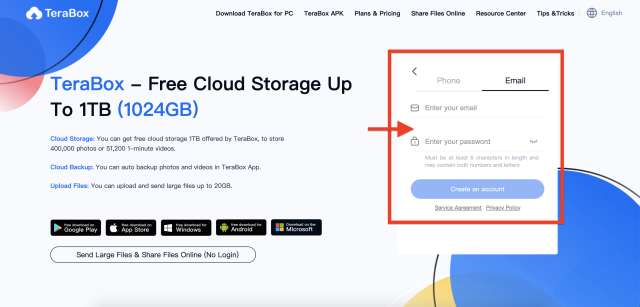
- Enter your email address and password. Please note that currently TeraBox only supports the types of mailboxes as listed below:
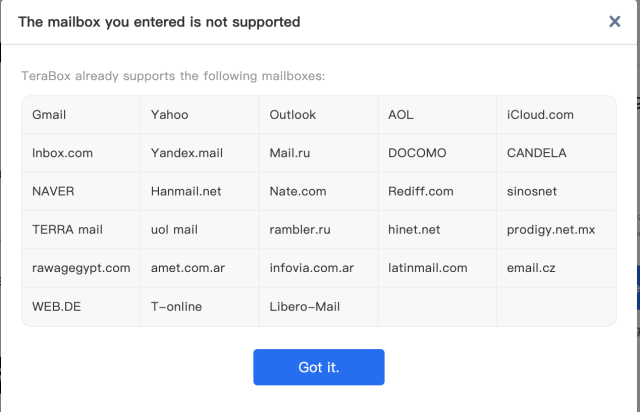
After entering the information, you will be directly landed to your newly created account.
Register with Phone Number
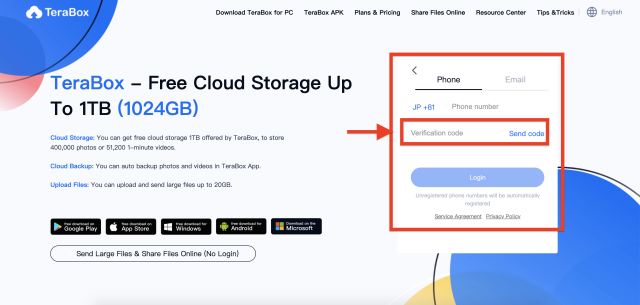
- Find “Phone or Email” on the signup page. Switch to the “Phone” tab.
- Find your country code and enter a valid phone number.
- After entering phone number, click “Send Code”. A verification code will be sent to your phone. Check your SMS messages and find the code to paste it in the “Verification Code” input box. Click “Login”. A new account will be created, and you can start using TeraBox.
Register with Google/Facebook/Apple ID
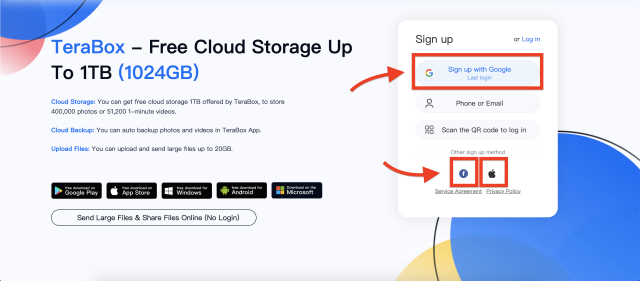
- Find the corresponding icon for Google, Facebook, or Apple ID signup.
- Enter your account and password of your Google, Facebook, or Apple ID account.
- A TeraBox account will be created successfully. You can use the same channel next time you log in to TeraBox.
Step 3. Log in to TeraBox
After creating an account, you can login TeraBox with that account on different devices. One of the benefits of logging in is that you can transfer and share files more easily and quickly.
You can either use the application on your computer or smartphone for the login, but if you haven’t installed the application, you can also use the web end to login to TeraBox without hassle.
I’ve Registered…What’s Next?
After users finish registering for an account, one of the most frequently asked question is, “how do I get the 1 TB storage?” Though TeraBox offers 1 TB of free cloud storage, some users might find they have less than that amount. In fact, you can upgrade storage in TeraBox to 1 TB by inviting one friend with only a few simple steps.
With an account, you can now fully enjoy the features that TeraBox has to offer, including file backup, file sharing, online video download, and so much more. If you want to learn more, we have posted another article on how to use TeraBox, which covers all of its best features.

FAQ
Why didn’t I get the verification code on my phone?
The verification code may be delayed because your local communication network is unstable. Here are a few ways to solve it:
- Restart your phone and re-connect to the network;
- Try to find better signal;
- Take out your SIM card and re-install it;
- Check if your SMS inbox is full;
- Try using your SIM card into another device to see if the problem stems from your device.
I’ve registered. Why does TeraBox say my account does not exist when I log in?
First, please check again if you log in with the same exact email or phone number that you used to sign up. Pay attention to uppercase, email service provider, and other details.
In addition, please confirm if you have registered a TeraBox account, or registered through third-party platforms (Google/Facebook/Apple ID). You cannot directly login with your third-party accounts; please login through their corresponding portals.
I forgot my account. What should I do?
In order to protect users’ privacy, please recall the method you have used to register. Try logging in with your frequently used email addresses and phone numbers.
I forgot my password. What should I do?
If you signed up with your email and forgot your password, you can click “Forgot you password?”, enter your registered email address. A password reset link will be sent to your mailbox. Click the link to reset the password.
Conclusion
To register on TeraBox is quite easy, as we have demonstrated above. After downloading and registering, you can not only get 1 TB cloud storage for free, but you can also use it to store your important files, backup your data automatically, and share files with other easily.
Now you are all set. Start enjoying your experience with TeraBox!